
CLI エージェント
ターミナルから使っているエージェントを、執筆ワークスペースの中で使います。
インストール済みのエージェントを Oleafly に持ち込めます。 CLI エージェントモードは、そのエージェントのランタイムとサインインを使うので、普段使っているツールで原稿のそばで作業できます。
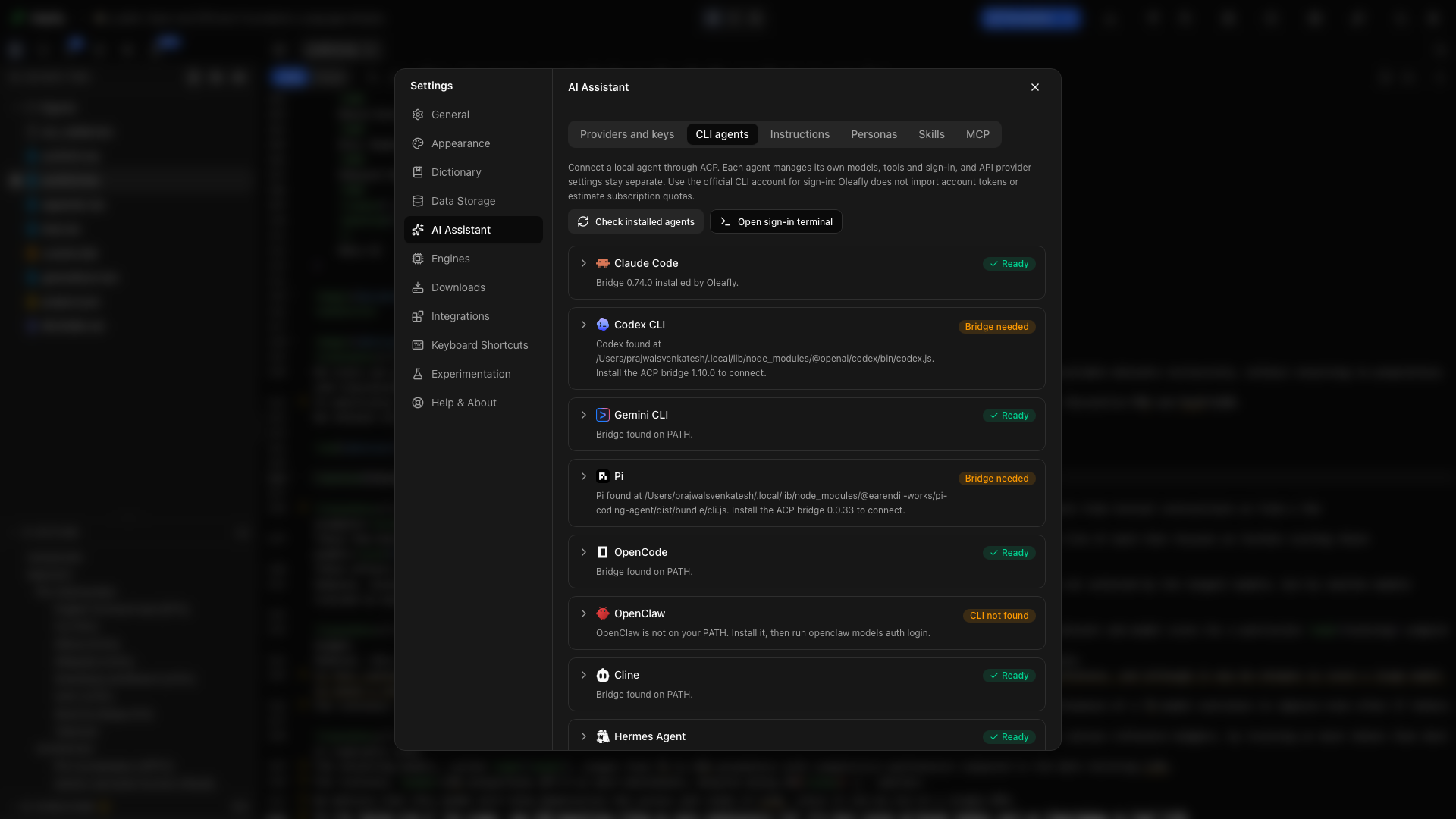
エージェントに接続する
「エージェントに接続する」セクション- 設定 → AI アシスタント → CLI エージェントを開き、 インストール済みのエージェントを確認を選びます。
- 使うエージェントを展開します。 プログラムの行に、Oleafly が見つけたプログラムとその場所が表示されます。
- テストを選びます。カードにブリッジが必要と表示されている場合は、先にブリッジをインストールを選びます。
- エージェント自身のコマンドラインツールでサインインします。カードにサインインのコマンドが表示され、プロジェクトを開いていれば、 サインイン用のターミナルを開くで、それを実行するためのターミナルが開きます。
- アシスタントを開き、 CLI エージェントに切り替えて、エージェントを選びます。
- プロジェクトの構成を説明してもらう、1 つの段落を修正してもらうといった、小さな作業から始めます。
まだ準備ができていないエージェントに切り替えると、アシスタントに、何が足りないかを示すセットアップのカードが表示されます。カードの Claude Code をセットアップ のようなボタンを押すと、設定でそのエージェントが開きます。足りないのがブリッジだけの場合は、カードのブリッジをインストールでインストールできます。
認証、モデルへのアクセス、課金は、選んだエージェントの側で扱われます。CLI に対応したアカウントやサブスクリプションは、そのプロバイダの規約に従って使えます。Oleafly が別の AI サブスクリプションを追加することはありません。
プログラムを選ぶ
「プログラムを選ぶ」セクションカードのプログラムの下に、Oleafly が起動するファイルと、その入手元が表示されます。 自動で検出か手動で選択か Oleafly がインストール のいずれかです。一部のエージェントでは、この行は代わりに ACP ブリッジの詳細の中にあります。
別のコピーを使うには、 選択… を選んでファイルを指定します。Oleafly が何も見つけられなかった場合、その行にこのコンピュータに見つかりませんと表示され、場所を入力する欄が出ます。パスを入力または貼り付けて、Enter を押すかテストを選びます。選んだ、または入力したファイルは、テストに合格した場合にのみ保存されます。 自動検出を使用を選ぶと、手動での選択が取り消されます。
Oleafly は、インストーラーがエージェントを置くフォルダを探します。
- Windows では、npm、pnpm、Scoop、winget などで、どのドライブにインストールしたエージェントも見つけます。検索パスは毎回読み直すので、Oleafly を開いている間にインストールしたエージェントも、 インストール済みのエージェントを確認で見つかります。
- macOS では、
~/.local/binや nvm のフォルダなど、通常はシェルだけが把握しているフォルダにあるエージェントも、Dock や Finder から Oleafly を開いた場合でも見つけます。
名前は合っているのに Oleafly が使えないファイルが見つかった場合、セットアップに、何が見つかったか、なぜ使えないかが表示されます。Windows でよくあるのは、Oleafly が .cmd か .exe を必要としているのに、PowerShell スクリプトが見つかるケースです。 Oleafly がスキップしたファイルには、そうしたファイルが理由とともに一覧表示されます。たとえば、フォルダ、デスクトップアプリ、node などのシェルやランタイム、ネットワーク上のコピーです。
設定のパスは、ポインタを合わせるか Tab キーで移動するまでぼかされています。そのため、設定のスクリーンショットを撮っても、ファイルの場所は写りません。
エージェントをテストする
「エージェントをテストする」セクションテストは、プロジェクトから離れた Oleafly 専用の空のフォルダでエージェントを起動し、応答を待ちます。何も保存されません。合格すると、エージェントの名前とバージョンが表示されます。失敗した場合は、理由を述べる 1 文と、試すことが 1 つ表示されます。
| テストの結果 | 試すこと |
|---|---|
| そこにファイルがない、またはフォルダ、デスクトップアプリ、Oleafly が起動できないファイルである | 選択… を選び、プログラム本体を指定する |
| ブリッジがまだインストールされていない | ブリッジをインストール |
| エージェントに Node.js、またはより新しいバージョンの Node.js が必要 | Node.js を入手 |
| エージェントは起動したが、応答しなかった、途中で止まった、または Oleafly が読み取れない応答を返した | 詳細をコピーする、またはターミナルを開くを選んで自分で実行する |
選んだファイルが、ファイル自体以外の理由でテストに失敗した場合、 このまま使用を選べば、そのまま保存されます。
エージェントの一覧
「エージェントの一覧」セクション| エージェント | CLI コマンド |
|---|---|
| Claude Code | claude |
| Codex CLI | codex |
| Gemini CLI | gemini |
| Pi | pi |
| OpenCode | opencode |
| OpenClaw | openclaw |
| Cline | cline |
| Hermes Agent | hermes |
| CodeBuddy | codebuddy |
| Kimi Code | kimi |
| Grok Build | grok |
| Cursor | cursor-agent または agent |
| DeepSeek Harness | dsh |
| Qoder | qodercli |
この一覧は、対応している起動方法を示します。利用できるモデル、添付、セッションの再開、使用状況の報告は、エージェントが提供する機能によって決まります。足りない要件は、セッションを始める前にセットアップが知らせます。
Pi は pi-acp ブリッジ (バージョン 0.0.34) を通して動作し、Oleafly がそのブリッジに、お使いの Pi のプログラムを指定します。Windows では、名前にスペースを含むプロジェクトフォルダも扱えます。
原稿のそばで作業する
「原稿のそばで作業する」セクションエージェントに具体的な依頼を出し、返信、ツールの動作、許可の確認をアシスタントパネルで追います。できあがったソースを開き、Oleafly でコンパイルします。
イントロダクションと手法を読んでください。用語の導入に一貫性がないものを、ファイルの場所とともに一覧にしてください。
別のコピーで作業して最終確認をしたい場合は、調査タスクで利用できるエージェントを選びます。分離した作業のプラットフォーム要件は、そのページに載っています。
調査の出発点
「調査の出発点」セクション新しい会話は、調査の出発点を並べたエージェントのホームページで始まります。出発点を選ぶとメッセージが入力されますが、送信はされないので、先に内容を読んで調整できます。まだ会話が開いていない場合は、会話が始まります。
| 出発点 | 依頼する内容 |
|---|---|
| 文献調査 | oleafly-literature-sweep スキルを使って、プロジェクトの研究課題について注釈付きの読書リストを作る |
| 関連研究 | oleafly-related-work を使って、読書リストと参考文献から関連研究のセクションを下書きする |
| 引用チェック | oleafly-verify-claims を使って、原稿の主張を引用元と照らして確認する |
| 原稿レビュー | oleafly-review-manuscript を使って、原稿全体をレビューする |
| 再現性チェック | 各結果を再現するために足りないもの (コード、データ、ソフトウェアのバージョン、乱数シード、ビルド手順) を洗い出す |
| 図のチェック | すべての図と表を確認する。キャプション、ラベル、相互参照、軸ラベルと単位、読みやすさ、グレースケールでも判別できる色を見る |
| Git レビュー | 未コミットの変更と最近のコミットをまとめ、意図していないように見える編集を指摘する。Git リポジトリでのみ表示される |
| 参考文献の整理 | 参考文献ライブラリの整理を開く。変更をプレビューしたうえで、引用キーを統一し、重複を取り除く |
チェックと原稿レビューでは、エージェントは原稿ファイルには手を付けず、結果を research/ 内のファイル (たとえば research/figure-audit.md) に書き出します。
出発点またはホームページのスキル一覧から選んだスキルは、メッセージの上にチップとして表示されます。Oleafly はメッセージと一緒にスキルの指示も送るので、Pi のように Oleafly のツールを使えないエージェントでも、その指示に従えます。チップをクリックすると外せます。そのプロジェクトでスキルがオフになっている場合、出発点はスキルなしでメッセージを入力します。
許可の要求
「許可の要求」セクションエージェントが実行の前に確認を求めると、カードに「エージェントが許可を求めています」と表示され、エージェント自身の選択肢が示されます。要求がファイルを変更するものである場合は、カードにそのファイルが一覧表示されます。 変更を表示を押すと、そのファイルの差分が開くので、答える前に内容を読めます。大きすぎて表示できない変更にはその旨が表示され、やり取りが終わったあとで確認できます。 閉じるを押すと、許可せずに要求を取り消します。2 分間放置した要求は期限切れになり、エージェントはもう一度確認を求める必要があります。
変更を確認して元に戻す
「変更を確認して元に戻す」セクションファイルを変更したやり取りのあとには、返信の下に変更数が表示されます。 レビューで個々の変更を確認でき、 元に戻すとやり直すは、ファイルごと、またはやり取り全体に対して使えます。仕組みと対象外になるものは、やり取りを確認して元に戻すで説明しています。
会話と書き出し
「会話と書き出し」セクションアシスタントのヘッダーには、 新しい会話と保存された会話とエージェントのセットアップがあります。各会話には、始まったときにプロジェクトがあった Git のコミットが記録されます。
Oleafly の外にコピーを残すには、 保存された会話を開いて 会話を書き出す… を選び、保存ダイアログで Markdown か JSON を選びます。Markdown ファイルの冒頭には、プロジェクト、エージェント、モデル、会話を始めたときのコミット (未コミットの変更があればその旨も記載)、開始日時と最終更新日時が書かれます。そのあとに、メッセージ、スキル、ツール呼び出し、変更されたファイルが続きます。JSON には完全な記録が入ります。
カスタムエージェント
「カスタムエージェント」セクションほかのエージェントを探すを選ぶと、ほかのチームが公開しているエージェントを ACP レジストリから検索できます。 カスタムエージェントを追加を選ぶと、定義を自分で貼り付けられます。実行する前に、実行ファイルまたはパッケージ、引数、接続要件を確認してください。定義を登録しても、エージェントのインストールや起動は行われません。
代わりに外部クライアントを使う
「代わりに外部クライアントを使う」セクションエージェント自身の画面で作業したい場合は、MCP で接続します。Oleafly の MCP サーバーは、Oleafly を開いている間、アプリのプロジェクトツールをエージェントに提供します。oleafly コマンドはアプリを閉じていても使え、oleafly-cli スキルはそのコマンドをエージェントに教えます。