
Templates
The template gallery: 28 ready-to-edit starting points in LaTeX, Typst, and Markdown, from resumes to IEEE papers, theses, Beamer decks, and posters, plus downloadable template packs.
本頁內容尚未翻譯。
Every Oleafly project starts from a template. The gallery gives you a real page-one preview of each one, so you pick by looking at the output, not by guessing from a name. Templates ship as plain, editable source, LaTeX, Typst, or Markdown depending on the template: what you create is yours.
The gallery
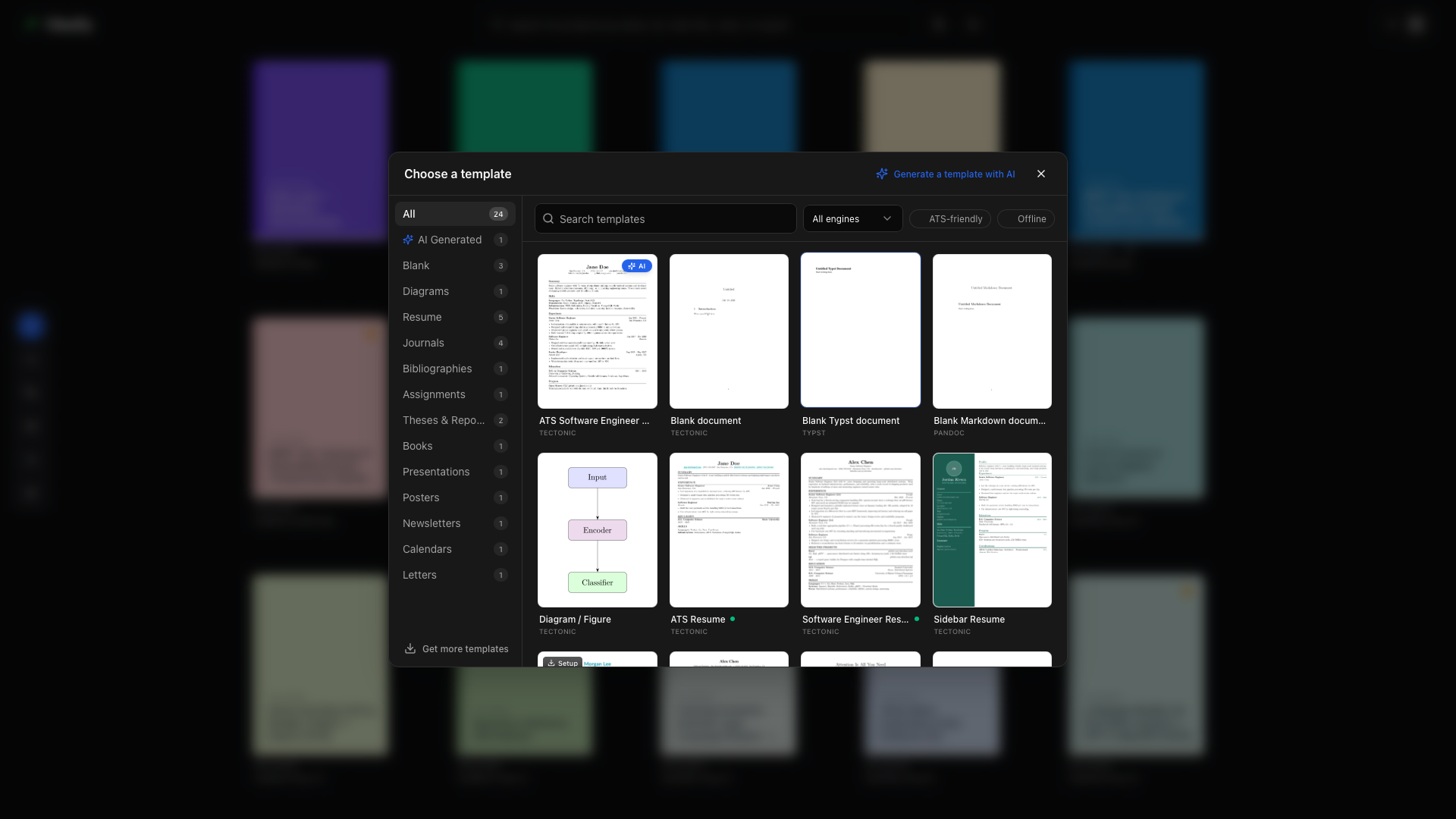
Section titled “The gallery”Choose New project → Use a template in the library. The gallery has two steps:
- Choose a template. Browse by category in the left rail, type in the Search templates box, or narrow the grid with the filters: ATS-friendly shows resume templates intended for a simple reading order, the engine filter picks LaTeX, Typst, or Markdown, and Offline shows templates whose assets are already on your machine. Every card shows a preview of the compiled first page.
- Name your project. You’ll see the template’s full details: its preview, category, an ATS-friendly or Design-forward badge for resumes, the compile engine, and its license and author. Pick a project name (each template suggests a sensible placeholder) and a cover color, then hit Create project. If no cover color is selected, Oleafly picks one from the palette at random.
The catalog
Section titled “The catalog”| Template | Category | What you get |
|---|---|---|
| Blank document | Blank | A minimal LaTeX article to start from scratch. |
| Blank Typst document | Blank | A minimal Typst document, compiled with the bundled Typst engine. |
| Blank Markdown document | Blank | A Pandoc Markdown document with YAML metadata. |
| Diagram / Figure | Diagrams | A standalone TikZ figure project; previews as an image and pairs with the diagram composer. |
| Typst Figure | Diagrams | A standalone Typst figure that previews as an image. Draw it with shapes and text, compile, and reuse it anywhere. |
| ATS Resume | Resume | Single-column, ATS-friendly resume with clean section rules. |
| Software Engineer Resume | Resume | A polished one-page SWE resume, pre-filled as a senior example so you edit instead of invent. |
| Sidebar Resume | Resume | Design-forward two-column layout: colored sidebar, photo placeholder, skills on the left, experience on the right. |
| Modern Resume | Resume | Single-column ATS-friendly resume set in the Lato typeface. |
| Typst Resume | Resume | A clean single-column Typst resume: quick to edit, ATS-friendly, compiled with the bundled Typst engine. |
| IEEE Research Paper | Journals | Two-column IEEEtran conference paper with figures, tables, equations, and a bibliography. |
| Academic Article | Journals | Minimalist single-column research article with abstract and a references.bib bibliography. |
| ACM Article | Journals | The official acmart class: authors, abstract, CCS concepts, references. |
| Elsevier Article | Journals | The elsarticle class: affiliations, abstract, keywords, and a references.bib bibliography. |
| Typst Conference-style Paper | Journals | A two-column conference-style paper in Typst with authors, an abstract, a figure, a table, an equation, and references. |
| Homework Assignment | Assignments | Title block, running header, numbered problems with solution space. |
| Bibliography (natbib) | Bibliographies | A natbib + BibTeX starter with a sample .bib and citation examples. |
| Thesis / Report | Theses & Reports | Title page, table of contents, chapters, and a references.bib bibliography. |
| Typst Report | Theses & Reports | A structured Typst report with numbered sections, an abstract, and cross-references. |
| Typst Technical Report | Theses & Reports | A full technical report in Typst with a title page, executive summary, contents, figures, tables, and references. |
| Typst Thesis | Theses & Reports | A Typst thesis with a title page, abstract, table of contents, chapters, figures, a bibliography, and an appendix. |
| Book | Books | Parts, chapters, front matter, table of contents. |
| Beamer Presentation | Presentations | A beamer deck: title, outline, content frames, closing slide. Exports to PowerPoint too. |
| Newsletter | Newsletters | Masthead, lead story, short columns in a two-column layout. |
| Research Poster | Posters | A tikzposter scientific poster: title banner, author block, column blocks. |
| Monthly Calendar | Calendars | A one-page monthly grid with roomy cells. |
| Formal Letter | Letters | Sender and recipient blocks, date, salutation, body, signature. |
| Typst Formal Letter | Letters | A formal letter in Typst with sender and recipient blocks, a date, a subject line, the body, and a signature. |
That is 28 bundled templates: 19 in LaTeX, 8 in Typst, and 1 in Markdown. LaTeX templates compile with the bundled Tectonic engine out of the box, or with latexmk if you made it the default compile engine. Typst templates use the bundled Typst engine, and Markdown templates go through the managed Pandoc path. The Typst templates use no packages, so they compile offline with any Typst from 0.13 to 0.15. Each template includes its license text (all permissive).
Downloadable template packs
Section titled “Downloadable template packs”The bundled set is deliberately compact. On-demand packs add more templates across academic writing, Beamer themes, business documents, conference preprint styles, coursework, creative documents, CV and resume styles, lab and technical reports, slides and posters, and journal or conference classes. Choose Get more templates in the gallery, or open Settings, Downloads, to install a pack. Its templates then appear in the gallery like any bundled one, and you can remove the pack later to free space. Packs come from a public catalog that Oleafly refreshes when you open Downloads while online, so the list can grow between app releases. Installing a pack needs a network connection.
AI-generated templates
Section titled “AI-generated templates”Choose Generate a template to describe your own layout to an AI model. Select a model, inspect the generated source and preview, then save the template or use it to create a project. Use this template also saves it in the gallery.
Generate a reusable report layout, step by step →
Resume templates and ATS
Section titled “Resume templates and ATS”Resume badges help you choose a layout:
- ATS-friendly (green badge): ATS Resume, Software Engineer Resume, Modern Resume. Single column, linear reading order, no layout tables, real text. Use the extraction preview to check what a parser can read from your finished PDF.
- Design-forward (amber badge): Sidebar Resume. It looks striking, and the badge is your heads-up that multi-column layouts can trip strict parsers.
Whichever you pick, run Preflight before submitting: it simulates a resume parser against your actual PDF and shows what was extracted.
On-demand fonts (the Setup badge)
Section titled “On-demand fonts (the Setup badge)”Templates that use additional open-source typefaces (like the Lato-based Modern Resume) show a small Setup badge in the gallery. Creating one triggers a one-time font download with live progress, and the fonts are copied into the project’s own fonts/ folder, so the fonts travel with your source files.
You can pre-download or remove these font packs anytime in Settings, Downloads. Details in Settings.
After creation
Section titled “After creation”The new project opens immediately with the template’s structure in the file tree: the main document, any .bib, and assets. Compile once (⌘↵ / Ctrl+Enter) and start replacing the sample content with your own. The template is editable LaTeX, Typst, or Markdown source. Replace its content and adapt the structure to your work.
The starting files are also saved as the project’s first Git commit, called Create project, so source control shows your own changes from the first edit. Start a new project explains when that commit is skipped.