
Réglages et personnalisation
Aide, diagnostics et mises à jour
Trouvez la version de l'application, reproduisez un problème et ouvrez la bonne ressource d'assistance.
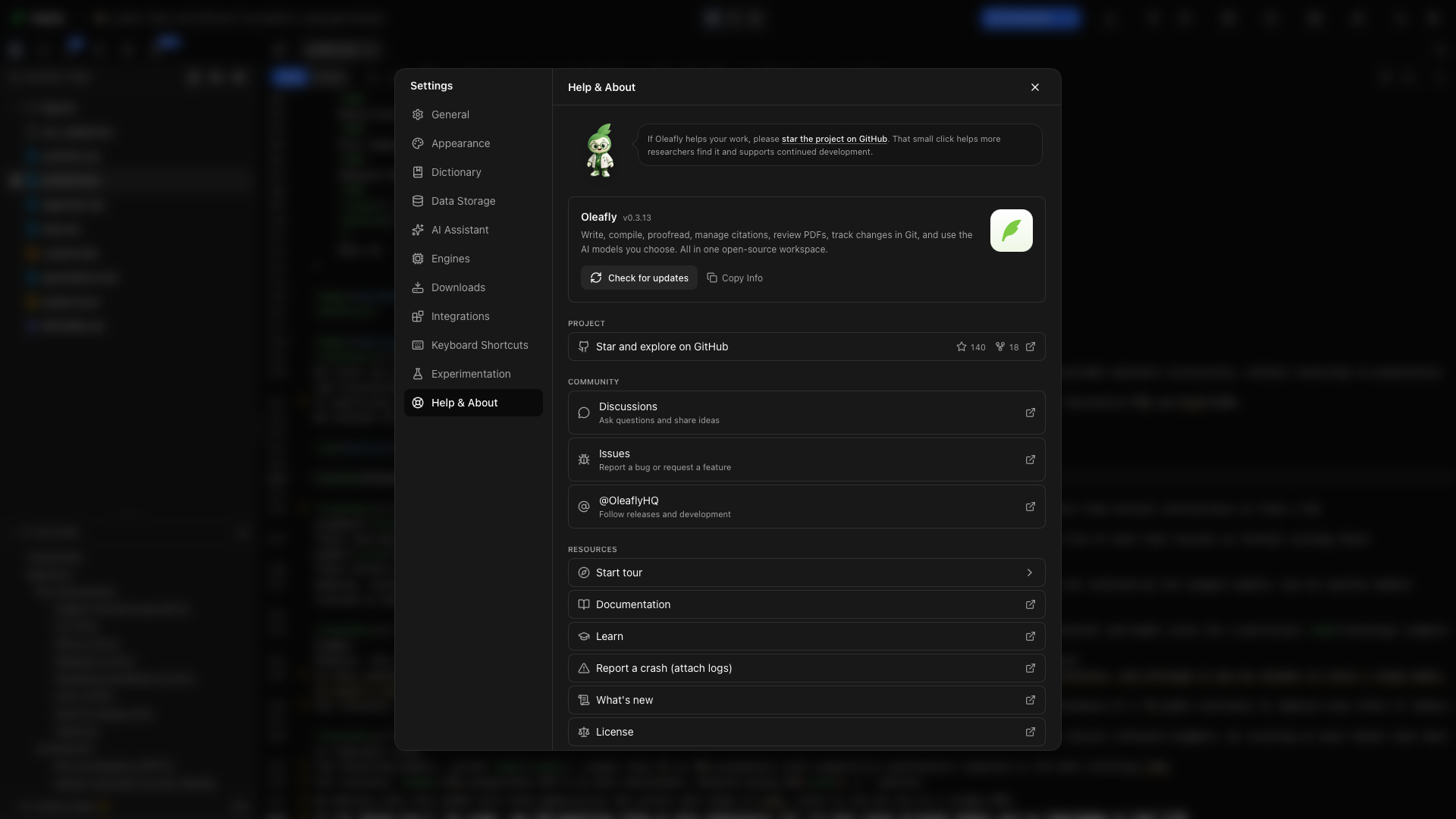
Ouvrez Paramètres → Aide et à propos. Cette page rassemble les informations de version, les liens du projet, l’assistance et les ressources d’apprentissage.
Version de l’application
Section intitulée « Version de l’application »Lisez la version affichée à côté d’Oleafly. Incluez-la quand vous signalez un problème, pour que quelqu’un d’autre puisse tester la même version. Rechercher des mises à jour se trouve sous la version ; Mises à jour de l’application explique ce qui se passe ensuite.
Copier les infos
Section intitulée « Copier les infos »Choisissez Copier les infos pour copier la version de l’application et, quand elles sont disponibles, la plateforme, l’architecture et la version du système. Collez ces informations dans votre signalement, avec les étapes qui reproduisent le problème.
Nouveautés
Section intitulée « Nouveautés »Choisissez Nouveautés, à côté de Copier les infos ou dans la liste Ressources, pour lire les notes de version dans Oleafly. L’en-tête indique la version installée et si une mise à jour est disponible.
La version la plus récente s’ouvre dépliée, ainsi que toute version plus récente que celle que vous avez. Les versions plus anciennes s’ouvrent repliées ; cliquez sur l’une d’elles pour lire ses notes. Dans la version la plus récente, une longue section est aussi repliée et affiche un compteur comme « 18 changements ». Ouvrez-la pour tout lire.
Le lien points forts du produit relie les fonctions à leurs guides.
Communauté
Section intitulée « Communauté »Choisissez Discord pour rejoindre le serveur communautaire Oleafly. Questions, rapports de bugs, idées de fonctions et conversations quotidiennes s’y déroulent, avec d’autres chercheurs et les personnes qui construisent l’application. C’est gratuit, et seul un compte Discord est nécessaire.
La ligne Discord indique combien de membres sont en ligne. Oleafly demande ce nombre à Discord uniquement pendant que Aide et à propos ou la fenêtre À propos est ouverte. La requête n’emporte aucune information de compte, de projet ou d’utilisation, et le mode hors ligne la saute.
Choisissez Oleafly, la ligne au logo X, pour suivre les versions et le développement.
Soutenir le projet
Section intitulée « Soutenir le projet »Mettre une étoile et explorer sur GitHub ouvre le dépôt du projet et affiche son nombre d’étoiles et de forks. Une étoile GitHub aide d’autres chercheurs à découvrir l’application.
Lancer la visite guidée
Section intitulée « Lancer la visite guidée »Choisissez Lancer la visite guidée pour fermer les Paramètres et démarrer le guide pertinent : la visite d’accueil depuis la bibliothèque, ou la visite de l’espace de travail depuis un projet.
Documentation
Section intitulée « Documentation »Choisissez Documentation pour ouvrir ces guides du produit. Commencez par le guide du contrôle ou du flux de travail que vous utilisez.
Apprendre
Section intitulée « Apprendre »Choisissez Apprendre pour les leçons LaTeX. Les leçons expliquent le langage des documents ; la documentation du produit explique où trouver ses outils dans Oleafly.
Signaler un plantage
Section intitulée « Signaler un plantage »Choisissez Signaler un plantage (avec les journaux) pour démarrer un rapport de plantage. Vérifiez le rapport et les pièces jointes avant de les envoyer. Précisez ce sur quoi vous avez cliqué, ce qui s’est passé, ce que vous attendiez, et si le problème se reproduit dans un projet vierge.
Choisissez Licence pour lire les conditions d’utilisation de l’application de bureau.
Citer Oleafly dans un article
Section intitulée « Citer Oleafly dans un article »La carte Citer Oleafly dans votre article est le dernier élément de la page. Elle contient une entrée BibTeX prête à copier pour la version que vous utilisez. Choisissez Copier le BibTeX, collez-la dans la bibliographie du projet et citez la clé oleafly.
Avec un projet ouvert, vous pouvez aussi exécuter Citer Oleafly dans cet article depuis la palette de commandes ou depuis le bas du panneau Références. Oleafly ajoute l’entrée à la bibliographie déclarée par le document et vous indique la syntaxe de citation à utiliser. Dans un projet Typst dont la bibliographie est un fichier Hayagriva .yml, l’entrée est écrite en Hayagriva. Si aucune bibliographie n’existe, Oleafly affiche l’entrée sans modifier les fichiers du projet. Voir Citations et bibliographie.
Vérifiez les consignes de citation de votre conférence ou de votre revue avant la soumission. Le lien sous la carte ouvre le dépôt sur GitHub, où Cite this repository donne la même référence en APA.
Boutons en bas de la barre latérale
Section intitulée « Boutons en bas de la barre latérale »Cinq boutons à icônes se trouvent en bas de la barre latérale des Paramètres, quelle que soit la section ouverte. Survolez-en un pour voir son nom :
| Icône | Nom | Ouvre |
|---|---|---|
| Logo Discord | Rejoindre la communauté Discord | Le serveur Discord d’Oleafly |
| Logo X | Suivre sur X | Oleafly sur X |
| Logo GitHub | Voir le code source | Le code source sur GitHub |
| Point d’interrogation | Documentation | Ces guides |
| Parchemin | Voir les notes de version | Les nouveautés, dans Oleafly |
Rédiger un signalement utile
Section intitulée « Rédiger un signalement utile »- Copiez les informations de l’application.
- Reproduisez le problème avec le plus petit document qui le montre encore. Pour les problèmes de compilation, un petit fichier d’exemple est plus utile qu’une simple capture d’écran. Retirez le contenu du manuscrit sans rapport avant de le partager.
- Listez les actions dans l’ordre, en précisant le moteur et la mise en page.
- Incluez la première erreur de compilation pertinente ou une capture d’écran du contrôle défaillant.
- Indiquez si redémarrer l’application change le résultat.
Pour un échec de compilation, commencez par Compilation et journaux. Pour des outils IA manquants, vérifiez l’état de connexion et de capacité du modèle sous Fournisseurs de modèles.