
إعداد مشروع بحثي
ابدأ بمخطوطة ومجلدات بحثية ومهمة أولى في LaTeX أو Typst أو Markdown.
يمنح المشروع البحثي مخطوطتك مكانًا تنمو فيه. اختر قالب بدء للدراسة، واستعرض المجلدات التي سينشئها، وابدأ بمهمة بحثية ملموسة.
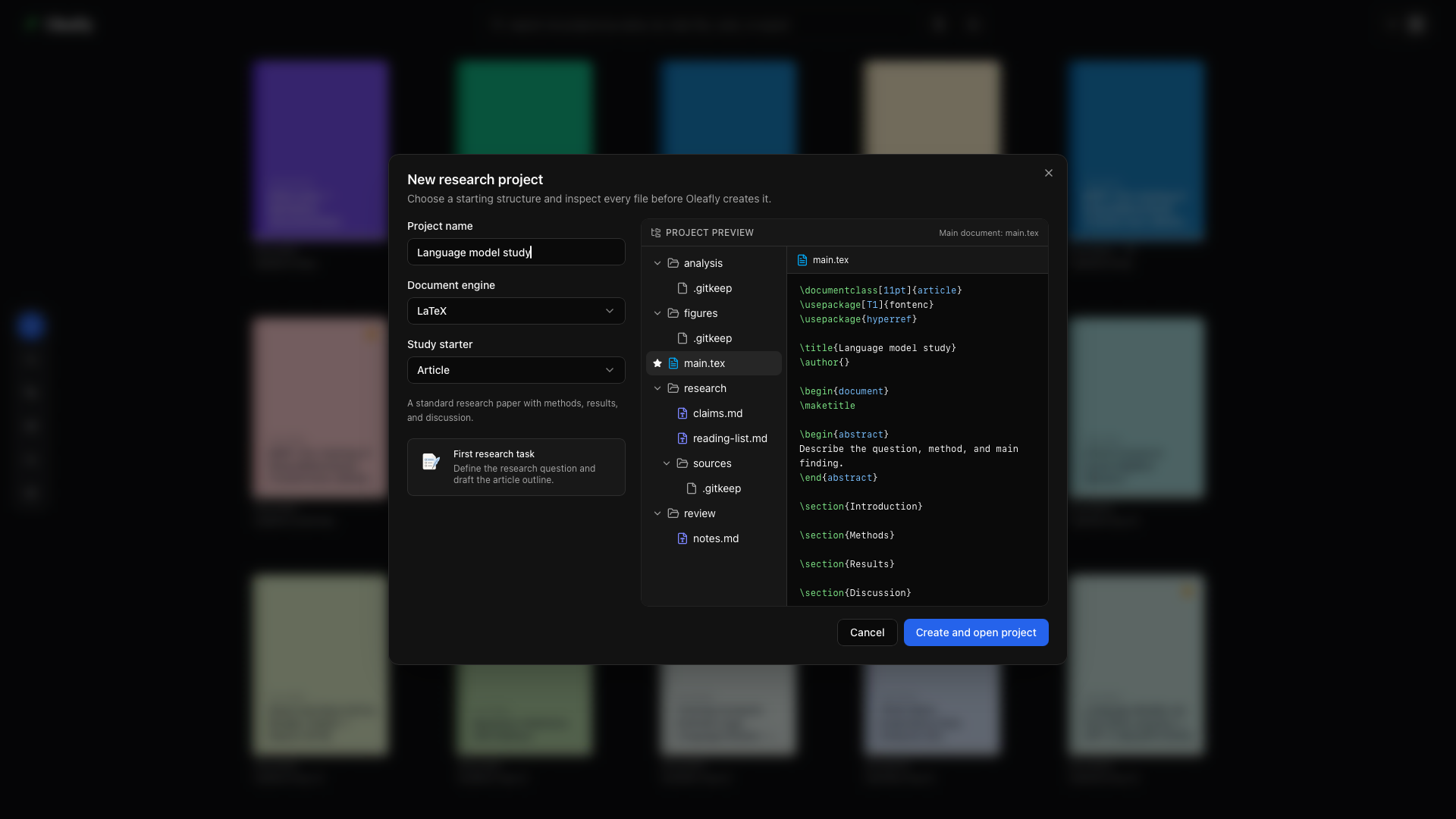
اختيار قالب البدء
قسم بعنوان “اختيار قالب البدء”اختر New project → Research project في المكتبة وأدخل اسمًا. اختر LaTeX أو Typst أو Markdown، ثم اختر قالب بدء الدراسة:
| قالب البدء | استخداماته |
|---|---|
| مقال | ورقة علمية منظمة حول المنهجية والنتائج والمناقشة |
| مراجعة الأدبيات | مراجعة تقودها المصادر مع تحديد النطاق والمحاور وفجوات الأدلة |
| أطروحة | دراسة أطول مع خلفية علمية وهيكل فصول |
| تحليل قابل لإعادة الإنتاج | مخطوطة مع توثيق أصل البيانات وملاحظات البيئة ومخرجات منفصلة |
استعراض المشروع
قسم بعنوان “استعراض المشروع”تعرض معاينة الإعداد الملفات والمجلدات قبل الإنشاء. تحقّق من محرّك المستندات وهيكل المخطوطة والمهمة الأولى. اختر Create and open project عندما تناسب نقطة البداية عملك.
تبقى مخطوطتك هي المستند الرئيسي. وتوضع ملاحظات البحث ومواد المراجعة والأشكال المولّدة في مجلدات المشروع العادية.
عندما يكون Git مثبّتًا وخيار Initialise Git for every project مفعّلًا في Settings → Integrations → GitHub، يبدأ المشروع الجديد عادةً بإيداع Git واحد لملفاته يسمى Create project، بحيث يعرض Source Control فروقًا حقيقية منذ أول تعديل.
إدخال مواد قائمة
قسم بعنوان “إدخال مواد قائمة”استخدم المجلدات المرتبطة لمجموعة بيانات أو مجلد تحليل أو مجموعة مراجع PDF موجودة بالفعل في مكان آخر. تمنح الروابط أدوات البحث وصولًا للقراءة دون نقل الأصول.
للمخطوطة القائمة بالفعل، استورد المشروع الأصلي وأضف المواد البحثية حوله.
بدء المهمة الأولى
قسم بعنوان “بدء المهمة الأولى”افتح Research workspace → Tasks. اختر قالب بدء مثل مراجعة الأدبيات أو تدقيق الأدلة، وحدّد النطاق، واختر وكيلًا. تعمل المهمة على نسخة منفصلة؛ وتراجع أنت نتائجها قبل تطبيق الملفات على المخطوطة.
للعمل في المشروع نفسه مع وكيل CLI، افتح المساعد وبدّل إلى CLI Agent. تعرض صفحته الرئيسية نقاط بدء بحثية مثل Literature sweep وCitation audit وReproducibility audit.