
使用 AI
研究技能
在文献、分析、写作、图片、审阅和提交中使用可重复的流程。
技能给助手一套可以遵循的流程。当一项工作需要的不只是一条新的提示词时,就用它:带来源记录的文献检索、证据核查,或者逐条回应每个审稿意见的回复信。
运行技能
标题为“运行技能”的部分在内置助手的输入框中输入 / 并选择一项技能。在技能名称后面写上任务:
/oleafly-literature-sweep Find papers on uncertainty calibration for small datasets. Save a source table with DOIs and a short note on each paper's evidence.你也可以自然地提问。助手在工作时可以加载相关且已启用的技能。斜杠调用会在该条消息中直接提供所选的技能。
在 CLI 代理对话中,你选的技能会连同它的指令一起发送,所以没有 Oleafly 工具的代理也能遵循它。
选择流程
标题为“选择流程”的部分| 你的下一步 | 技能 |
|---|---|
| 规划跨越多个阶段的工作 | oleafly-research-loop |
| 查找并标注来源 | oleafly-literature-sweep |
| 开始一篇稿件 | oleafly-manuscript-scaffold |
| 起草相关工作 | oleafly-related-work |
| 分析项目数据 | oleafly-data-analysis |
| 准备或修复一张图 | oleafly-figure-prep |
| 对照参考文献核查论断 | oleafly-verify-claims |
| 审阅一篇稿件 | oleafly-review-manuscript |
| 准备提交 | oleafly-pre-submission |
| 回复审稿人 | oleafly-response-letter |
| 制作幻灯片或海报 | oleafly-slides-and-posters |
| 修复 LaTeX 构建 | oleafly-latex-build |
内置的技能包还涵盖研究设计、统计分析、科学写作、引用管理和其他研究方法。其中有几项内置技能同时适用于 Typst 和 LaTeX。
查找并开启技能
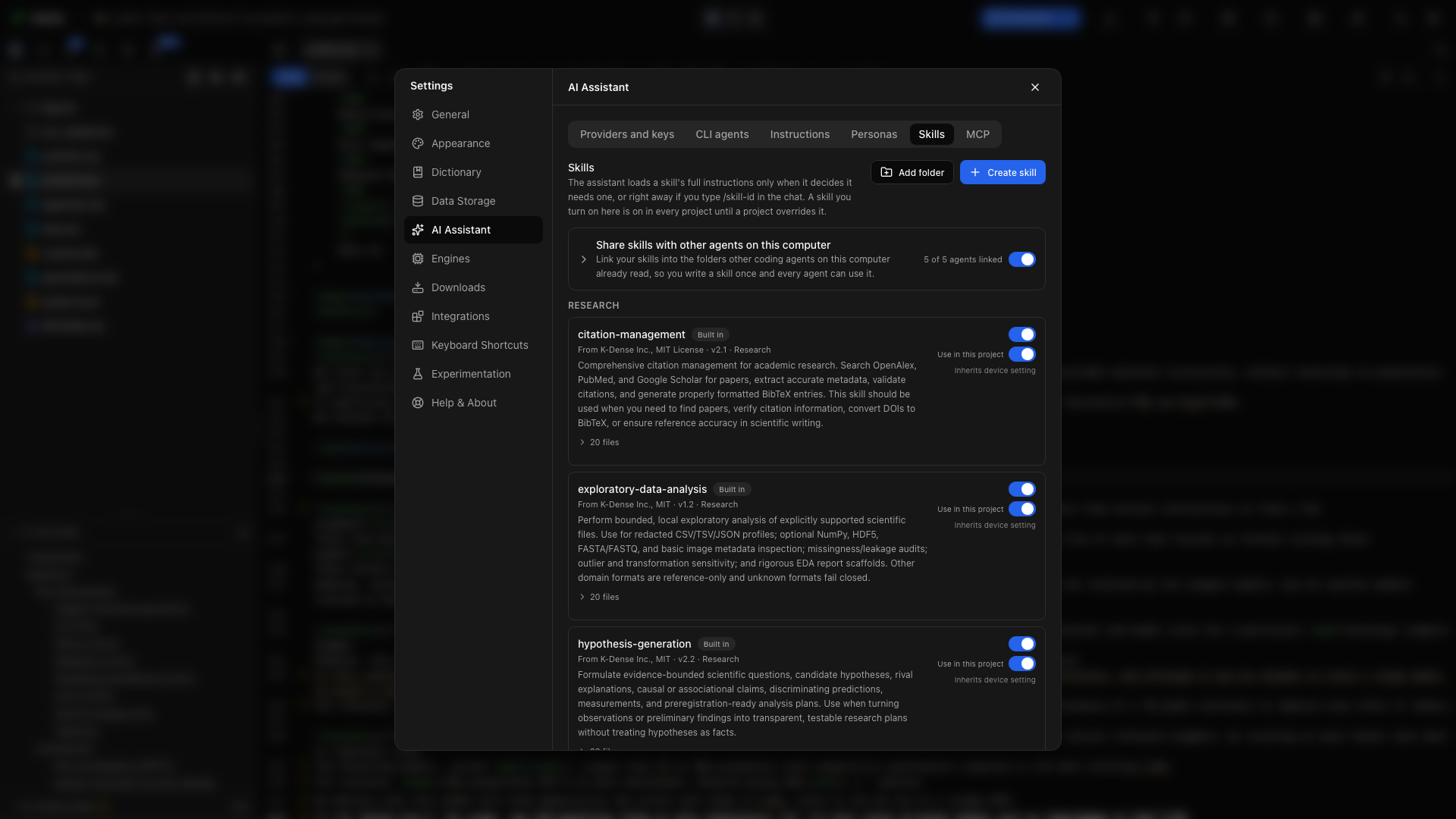
标题为“查找并开启技能”的部分设置 → AI 助手 → 技能会按阶段分组列出你的技能,后面是领域技能库。
- 搜索技能会同时筛选你的技能和领域技能库。如果只想看一个研究领域,技能库还有一个领域菜单。
- 每项技能有一个开关。开启一项技能后,它在所有项目中都会生效。
- 打开项目时,列表顶部的所有项目和此项目决定开关更改的范围。选择此项目,只为当前打开的项目开启或关闭某项技能。在那里设置得不同的技能会显示已为此项目更改,旁边的重置按钮可把它恢复为“所有项目”的设置。
添加你自己的技能
标题为“添加你自己的技能”的部分用创建技能填写名称、描述和指令。添加文件夹会导入包含 SKILL.md 文件的技能目录。其格式遵循 Agent Skills 标准 (在新标签页中打开),指令旁边可以放可选的脚本、参考资料和资源。
领域技能库提供额外的技能,需要时可以安装。
与此计算机上的其他代理共享技能会把你的技能链接到其他编码代理已经在读取的文件夹中,这样你只需编写一次技能,所有代理都能使用。其中包括 oleafly-cli,它会教代理使用 oleafly 命令。
把对话变成技能
标题为“把对话变成技能”的部分一次有用的聊天之后,选择录制技能。Oleafly 会根据对话和已完成的步骤起草一套流程。检查其中的指令,删去针对某篇论文的细节,然后启用它供今后使用。
例如,保存你所在实验室的图片规范,或准备方法章节的检查清单。把可重复的方法放进技能,把每篇论文的数据放进提示词。
检查证据
标题为“检查证据”的部分技能负责组织工作,执行的仍然是所选的模型。请把来源标识符、分析脚本和审稿意见的对应关系保存在输出中,这样你就能检查结果。