
रिसर्च प्रोजेक्ट सेट अप करें
LaTeX, Typst या Markdown में एक पांडुलिपि, रिसर्च फ़ोल्डर और एक प्रारंभिक टास्क के साथ शुरुआत करें।
रिसर्च प्रोजेक्ट आपकी पांडुलिपि को बढ़ने की जगह देता है। एक स्टडी स्टार्टर चुनें, जो फ़ोल्डर बनेंगे उनका पूर्वावलोकन करें, और एक ठोस रिसर्च टास्क से शुरुआत करें।
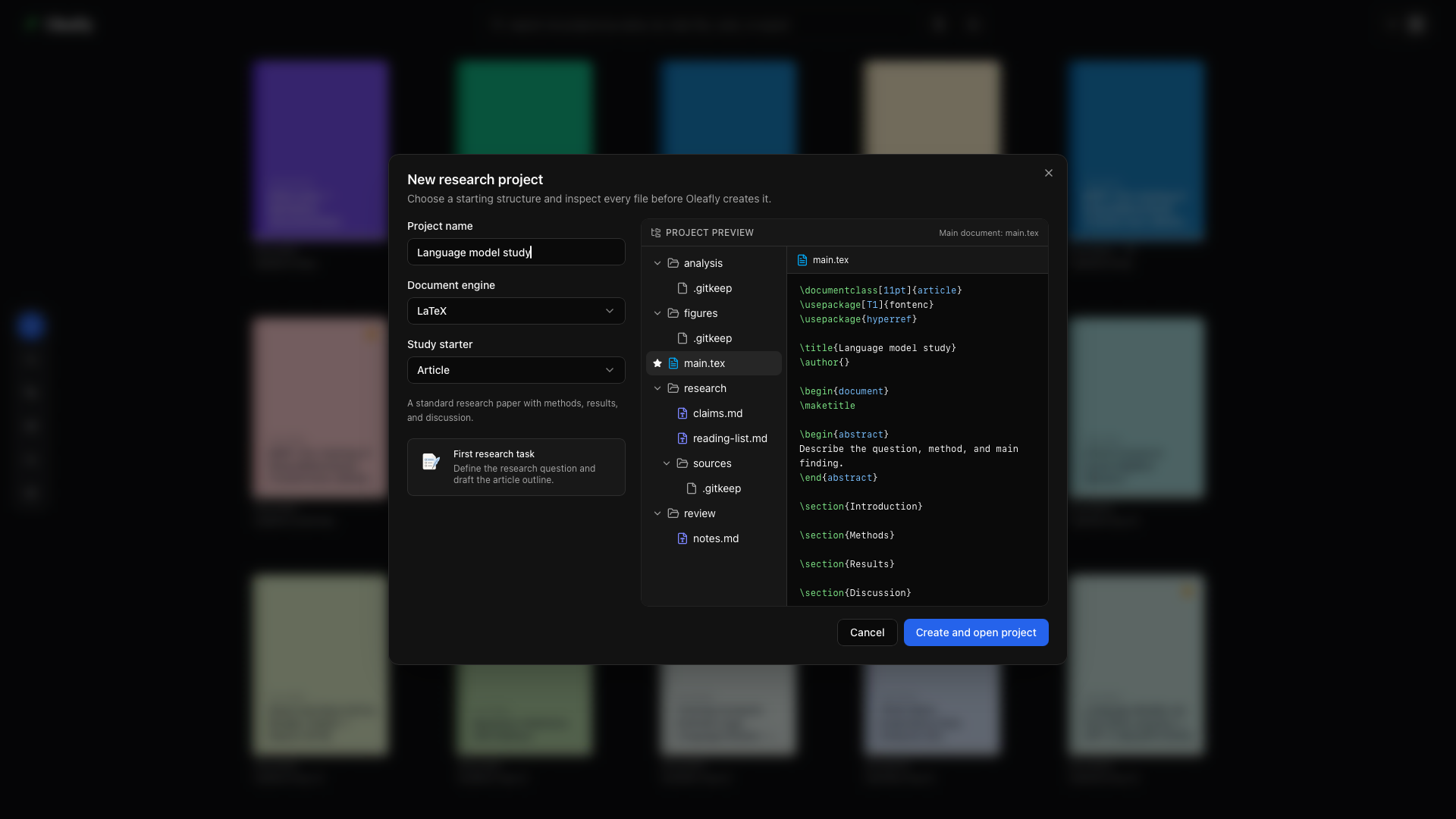
स्टार्टर चुनें
“स्टार्टर चुनें” शीर्षक वाला अनुभागलाइब्रेरी में New project → Research project चुनें और एक नाम दर्ज करें। LaTeX, Typst या Markdown चुनें, फिर स्टडी स्टार्टर चुनें:
| स्टार्टर | इसका उपयोग करें |
|---|---|
| Article | तरीकों, परिणामों और चर्चा के इर्द-गिर्द आयोजित एक पेपर |
| Literature review | दायरे, थीम और प्रमाण-अंतराल के साथ स्रोत-प्रधान समीक्षा |
| Thesis | पृष्ठभूमि और अध्याय संरचना वाला एक लंबा अध्ययन |
| Reproducible analysis | डेटा प्रोवेनेन्स, परिवेश टिप्पणियों और अलग आउटपुट वाली पांडुलिपि |
प्रोजेक्ट का पूर्वावलोकन करें
“प्रोजेक्ट का पूर्वावलोकन करें” शीर्षक वाला अनुभागसेटअप पूर्वावलोकन बनाने से पहले फ़ाइलें और फ़ोल्डर दिखाता है। डॉक्यूमेंट इंजन, पांडुलिपि संरचना और प्रारंभिक टास्क जांचें। जब शुरुआती बिंदु आपके काम के अनुकूल हो, तो Create and open project चुनें।
आपकी पांडुलिपि ही मुख्य दस्तावेज़ बनी रहती है। रिसर्च नोट्स, समीक्षा सामग्री और बनाए गए चित्र सामान्य प्रोजेक्ट फ़ोल्डरों में रहते हैं।
जब Git इंस्टॉल हो और Settings → Integrations → GitHub में Initialise Git for every project चालू हो, तो नया प्रोजेक्ट प्रायः अपनी फ़ाइलों के एक Git कमिट, जिसका नाम Create project है, के साथ शुरू होता है, ताकि Source Control पहले संपादन से ही असली अंतर दिखाए।
मौजूदा सामग्री लाएं
“मौजूदा सामग्री लाएं” शीर्षक वाला अनुभागकिसी ऐसे डेटासेट, विश्लेषण निर्देशिका या संदर्भ PDF के संग्रह के लिए लिंक किए गए फ़ोल्डर का उपयोग करें जो पहले से कहीं और स्थित है। लिंक मूल फ़ाइलों को हिलाए बिना रिसर्च टूल्स को पढ़ने की पहुंच देते हैं।
पहले से मौजूद पांडुलिपि के लिए सोर्स प्रोजेक्ट इंपोर्ट करें और उसके चारों ओर रिसर्च सामग्री जोड़ें।
पहला टास्क शुरू करें
“पहला टास्क शुरू करें” शीर्षक वाला अनुभागResearch workspace → Tasks खोलें। Literature review या Evidence audit जैसा कोई स्टार्टर चुनें, दायरा तय करें, और एक एजेंट चुनें। टास्क एक अलग कॉपी पर काम करता है; फ़ाइलों को पांडुलिपि में लागू करने से पहले आप उसके परिणामों की समीक्षा करते हैं।
किसी CLI agent के साथ प्रोजेक्ट में ही काम करने के लिए असिस्टेंट खोलें और CLI Agent पर स्विच करें। इसका होम पेज Literature sweep, Citation audit और Reproducibility audit जैसे रिसर्च शुरुआती बिंदु प्रदान करता है।