
Overview
Esta página aún no está disponible en tu idioma.
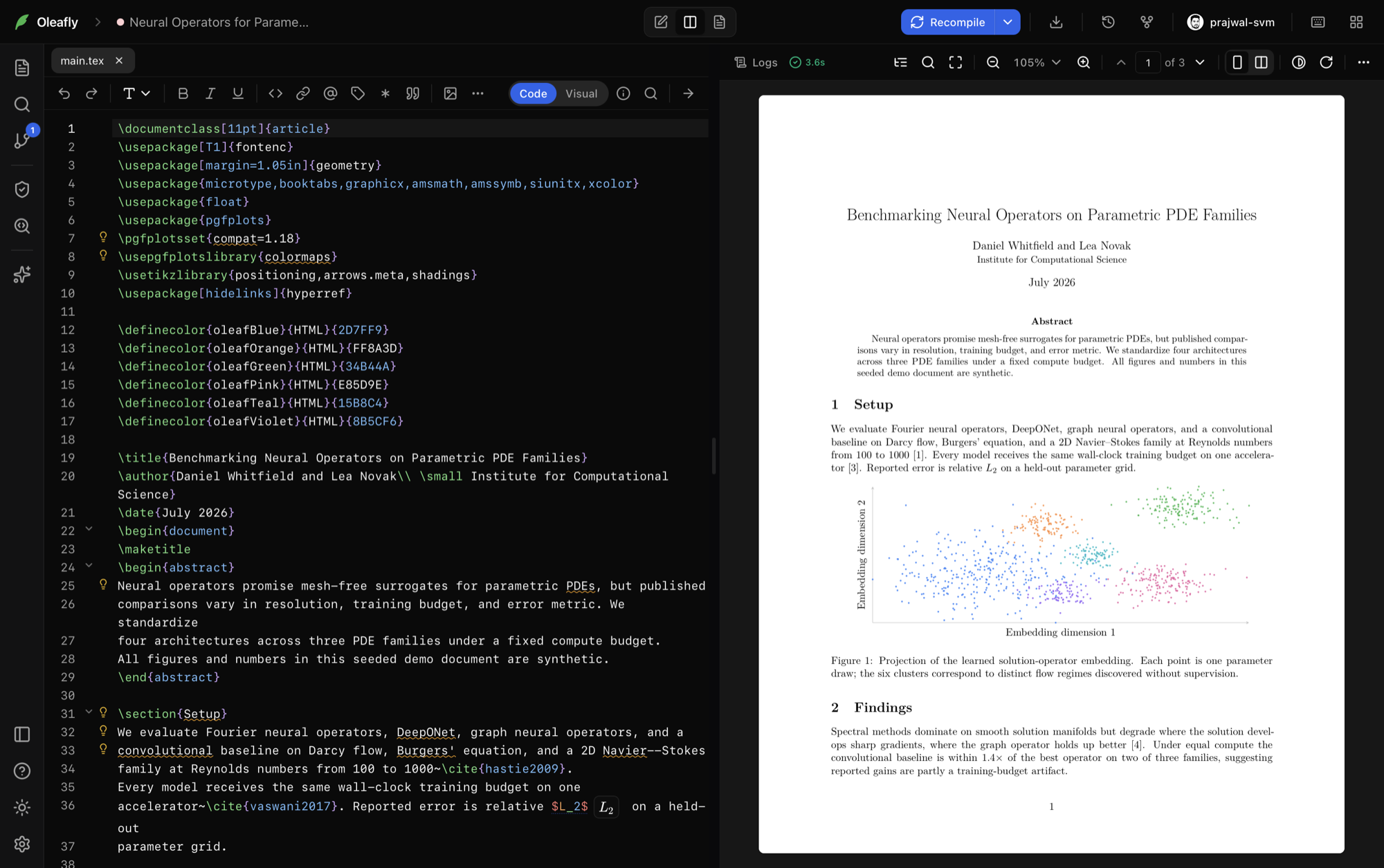
Oleafly is a free, local-first workspace for research papers, technical documents, and resumes on macOS, Windows, and Linux. You get a full writing and compile loop on your machine: no account, no subscription, no upload required to produce a PDF.
Write on the left, preview on the right. Citations, Preflight checks, diagrams, Git history, and an approval-gated AI assistant sit in the same app.
Who it’s for
Section titled “Who it’s for”- Researchers and academics writing papers for IEEE, ACM, Elsevier, and similar venues, with bibliography management, cross-file navigation, and SyncTeX.
- Students and PhD candidates writing theses, reports, homework, and Beamer talks.
- Engineers and technical writers shipping long-form docs, diagrams, and exports beyond PDF.
- Job seekers building resumes that survive applicant tracking systems, with ATS-minded templates and a Preflight panel that shows what a parser extracts.
- Anyone who wants typeset documents without babysitting a multi-gigabyte TeX tree: books, posters, newsletters, letters, and figures are a template away.
What you get
Section titled “What you get”A complete document environment, zero TeX setup
Section titled “A complete document environment, zero TeX setup”The default LaTeX compiler, Tectonic, ships with the app. Packages download when a document first needs them and stay cached for later offline use. Projects that need an Overleaf-style toolchain can use latexmk with pdfLaTeX, XeLaTeX, or LuaLaTeX.
LaTeX is not the only engine: Typst projects use a bundled Typst compiler, and Markdown projects build to PDF through managed Pandoc. One workspace covers all three.
A serious editor
Section titled “A serious editor”CodeMirror 6 with LaTeX-aware autocomplete and slash commands, a formatting toolbar, find and replace with regex, code folding, Vim mode, and offline spelling and grammar that skips commands and math. Projects can use a Code / Visual toggle where a rich view is available.
Code intelligence across the project
Section titled “Code intelligence across the project”Go to definition, find references, and project-wide rename for labels, citations, and macros. Hover a \ref or \cite to see the target. The project index follows your \input graph across files.
Live PDF preview with SyncTeX
Section titled “Live PDF preview with SyncTeX”A virtualized PDF preview with zoom, spreads, a detached window, and bidirectional SyncTeX: jump from the cursor into the PDF, or Cmd/Ctrl-click a word in the PDF to land on it in the source.
Citations without copy-paste archaeology
Section titled “Citations without copy-paste archaeology”Paste a DOI, arXiv id, or paper title. Oleafly fetches BibTeX, deduplicates against your .bib, and inserts \cite at the cursor. Citation lookup talks to doi.org, arXiv, and Crossref. Optional Zotero and alphaXiv hooks live under Integrations.
Figures, drawn or generated
Section titled “Figures, drawn or generated”A diagram composer with canvas and TikZ code, live preview, and round-trip editing. Or draw with AI: describe a figure, refine it against compile (and vision when available), then insert editable LaTeX.
Preflight before submission
Section titled “Preflight before submission”Before you submit, Preflight checks compile and layout quality, publisher profiles, ATS parsing, accessibility, references, and privacy for blind review. It separates verified findings from advice, shows the text a machine can extract, and can prepare a tagged export flow.
Research helpers in the app
Section titled “Research helpers in the app”From the home dock, Oleafly Tools includes a BibTeX validator, table generator, equation preview, academic lab search, PDF-to-LaTeX import, and a conference deadlines board. Many of the same surfaces also exist on oleafly.com/tools and oleafly.com/deadlines.
An AI assistant that does real work
Section titled “An AI assistant that does real work”Bring your own key from the built-in providers, add a custom OpenAI-compatible endpoint, or run Ollama fully local. The assistant reads the project, edits with red/green approval diffs, compiles, reads logs, and can search literature. Personas and a default model live in Settings.
Your history, in real Git
Section titled “Your history, in real Git”Every project is a plain folder with a real Git repo. Stage, commit, diff, and restore from Source Control with no GitHub account required. Push and pull when you want an off-machine remote.
Export where the document has to go
Section titled “Export where the document has to go”PDF always, plus Word, HTML, Markdown, plain text via Pandoc (fetched on demand), PowerPoint for Beamer, and EPUB for books. See Export formats.
Where everything lives
Section titled “Where everything lives”Projects sit under ~/.oleafly/projects/ as ordinary folders: .tex, .bib, images, .git. No proprietary lock-in. See Where your data lives.
Website languages
Section titled “Website languages”oleafly.com is available in 18 languages. English is the default at the root URL. Every other language uses a locale prefix, such as /zh-cn/, /ja/, or /es/. The header language switcher lists each option with a flag and native name.
| Flag | Code | Language | Home |
|---|---|---|---|
| 🇺🇸 | en |
English | oleafly.com |
| 🇨🇳 | zh-cn |
简体中文 | /zh-cn/ |
| 🇹🇼 | zh-tw |
繁體中文 | /zh-tw/ |
| 🇯🇵 | ja |
日本語 | /ja/ |
| 🇰🇷 | ko |
한국어 | /ko/ |
| 🇪🇸 | es |
Español | /es/ |
| 🇧🇷 | pt-br |
Português (Brasil) | /pt-br/ |
| 🇫🇷 | fr |
Français | /fr/ |
| 🇩🇪 | de |
Deutsch | /de/ |
| 🇮🇳 | hi |
हिन्दी | /hi/ |
| 🇮🇹 | it |
Italiano | /it/ |
| 🇳🇱 | nl |
Nederlands | /nl/ |
| 🇵🇱 | pl |
Polski | /pl/ |
| 🇷🇺 | ru |
Русский | /ru/ |
| 🇺🇦 | uk |
Українська | /uk/ |
| 🇹🇷 | tr |
Türkçe | /tr/ |
| 🇸🇦 | ar |
العربية | /ar/ |
| 🇻🇳 | vi |
Tiếng Việt | /vi/ |
Language choice is preference-based (URL, saved switcher choice, or a one-time browser-language banner on /). It is not hard-locked by geo-IP. Shared deep links keep their language. Learn, blog, templates, tools, and the landing page all follow the same prefixes (for example Japanese Learn, Simplified Chinese blog).
The desktop app UI language is separate from the website. See Which languages does the website support? in the FAQ.
Start here
Section titled “Start here”- Download and install for your platform.
- Getting started: first project to first PDF in a couple of minutes.
- Browse templates, or walk the free Learn curriculum on the web.
How Oleafly compares to Overleaf, VS Code, and TeXstudio: Why Oleafly. Design principles: Philosophy.