
Overview
Oleafly is a free, local-first LaTeX editor and resume studio for macOS, Windows, and Linux. It gives you the full writing experience of a cloud LaTeX service, the compiler included, on your own machine: no account, no subscription, no upload, no waiting on someone else’s build queue.
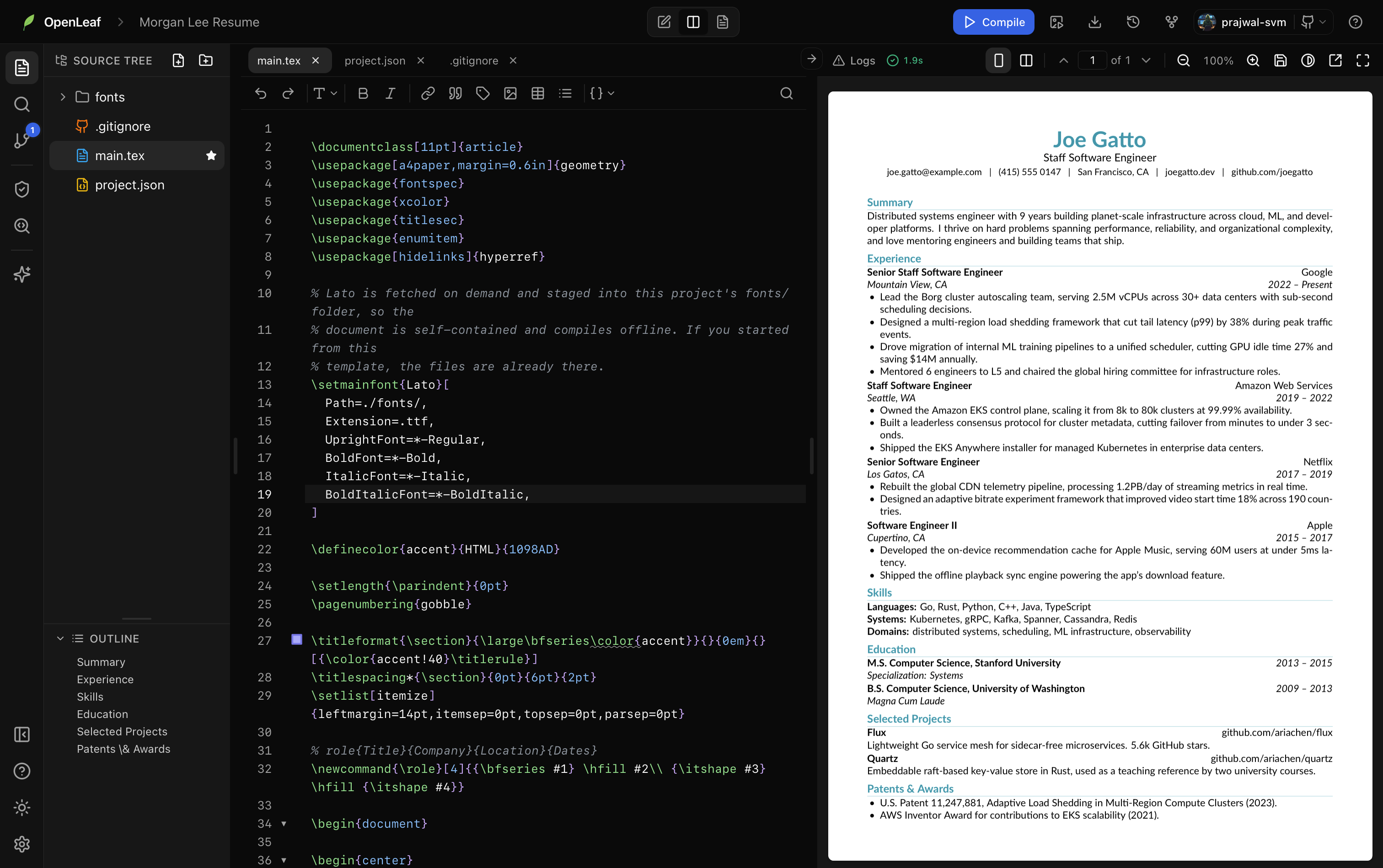
You write on the left, the PDF builds on the right, and everything in between is built in: citation lookups, accessibility checks, even an AI assistant that can edit your files with your approval.
Who it’s for
Section titled “Who it’s for”- Researchers and academics writing papers for IEEE, ACM, or Elsevier venues, with real bibliography management, cross-file navigation, and SyncTeX.
- Students and PhD candidates writing theses, reports, homework assignments, and Beamer presentations.
- Job seekers building resumes that actually survive applicant tracking systems. Oleafly ships ATS-friendly templates and a Preflight panel that simulates what a resume parser extracts from your PDF.
- Anyone who wants beautiful typeset documents without installing and maintaining a multi-gigabyte TeX distribution: books, posters, newsletters, letters, calendars, and standalone figures are all templates away.
What you get
Section titled “What you get”A complete LaTeX environment, zero setup
Section titled “A complete LaTeX environment, zero setup”The compiler (Tectonic, XeTeX-based) ships inside the app. Packages download automatically the first time you use them and are cached forever after, so your second compile onward works fully offline. There is nothing to install, configure, or update by hand.
A serious editor
Section titled “A serious editor”CodeMirror 6 with LaTeX-aware autocomplete and slash commands, a formatting toolbar, find and replace with regex and preserve-case, code folding, Vim mode, and offline spelling and grammar checking that understands LaTeX and skips your commands and math.
Code intelligence across your whole project
Section titled “Code intelligence across your whole project”Go to definition, find references, and project-wide rename for labels, citations, and macros. Hover a \ref or \cite to see what it points to. The project index understands your \input graph, so navigation works across files.
Live PDF preview with SyncTeX
Section titled “Live PDF preview with SyncTeX”A fast, virtualized PDF preview with zoom, spreads, a detached window for your second monitor, and bidirectional SyncTeX: jump from the cursor to the exact spot in the PDF, or Cmd/Ctrl-click a word in the PDF to land on it in the source.
Citations without the copy-paste
Section titled “Citations without the copy-paste”Paste a DOI, an arXiv id, or a paper title. Oleafly fetches the BibTeX, deduplicates it against your .bib, and inserts the \cite at your cursor. Citation lookup talks directly to doi.org, arXiv, and Crossref.
Figures, drawn or generated
Section titled “Figures, drawn or generated”A built-in diagram composer with a visual editor and a TikZ code editor, live compiled preview, and round-trip editing. Or draw with AI: describe a figure, and the assistant drafts TikZ, compiles it in isolation, and refines it until it looks right.
Preflight: ATS and accessibility checks
Section titled “Preflight: ATS and accessibility checks”Before you submit, Preflight scores your document for resume parsers and screen readers, shows you exactly what an ATS extracts from your PDF, finds undefined references and duplicate labels, and can prepare your source for a tagged, Section 508 / PDF-UA oriented export.
An AI assistant that does real work
Section titled “An AI assistant that does real work”Bring your own key from any of nine providers, or run fully local with Ollama. The assistant reads your project, edits files (every change pauses for your approval with a diff), compiles, reads the log, and verifies the output. It fixes LaTeX errors, restructures sections, and answers questions about your own paper.
Your history, in real Git
Section titled “Your history, in real Git”Every project is a plain folder with a real Git repository. Stage, commit, diff, and restore from the Source Control panel, and sync to GitHub to back up or move between machines.
Export to wherever the document has to go
Section titled “Export to wherever the document has to go”PDF always, plus Word, HTML, Markdown, and plain text via pandoc (fetched on demand), PowerPoint for Beamer decks, and EPUB for books. See Export formats.
Where everything lives
Section titled “Where everything lives”Your projects are plain folders under ~/.openleaf/projects/, each with your .tex, .bib, images, and a .git history. No proprietary formats, no lock-in: back them up, copy them, or open them with any other tool whenever you like. See Where your data lives.
Start here
Section titled “Start here”- Download and install for your platform.
- Follow Getting started: first project to first PDF in about two minutes.
- Browse the templates to see what Oleafly can produce out of the box.
If you’re wondering how Oleafly compares to Overleaf, VS Code, or TeXstudio, read Why Oleafly. If you want to understand the thinking behind the product, read the Philosophy.