


Collection de styles de CV et de CV
ModerneCV Classique
La mise en page ModernCV classique avec une règle de section colorée, des entrées étiquetées et un en-tête personnel propre.
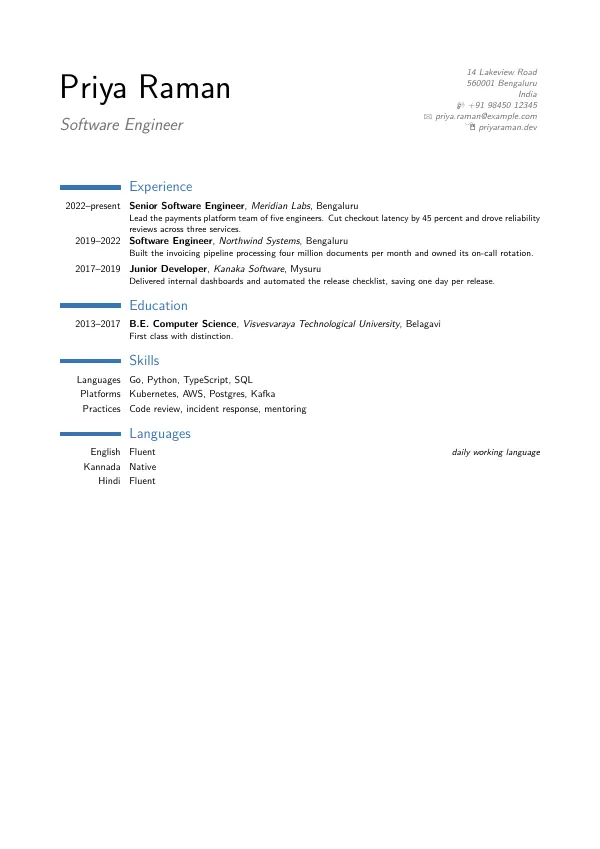
main.tex
\documentclass[10pt,a4paper,sans]{moderncv}
% Tectonic cannot load the FontAwesome and Academicons fonts, so pretend the
% packages are present and use the marvosym icon set instead.
\makeatletter
\@namedef{[email protected]}{2022/05/02 v5.15.4 stub}
\@namedef{[email protected]}{2020/03/25 v1.9.4 stub}
\makeatother
\newcommand*{\faCircle}[1][]{\textbullet}
\moderncvstyle{classic}
\moderncvcolor{blue}
\moderncvicons{marvosym}
\usepackage[scale=0.8]{geometry}

\name{Priya}{Raman}
\title{Software Engineer}
\address{14 Lakeview Road}{560001 Bengaluru}{India}
\phone[mobile]{+91~98450~12345}
\email{[email protected]}
\homepage{priyaraman.dev}

\begin{document}
\makecvtitle

\section{Experience}
\cventry{2022--present}{Senior Software Engineer}{Meridian Labs}{Bengaluru}{}{Lead the payments platform team of five engineers. Cut checkout latency by 45 percent and drove reliability reviews across three services.}
\cventry{2019--2022}{Software Engineer}{Northwind Systems}{Bengaluru}{}{Built the invoicing pipeline processing four million documents per month and owned its on-call rotation.}
\cventry{2017--2019}{Junior Developer}{Kanaka Software}{Mysuru}{}{Delivered internal dashboards and automated the release checklist, saving one day per release.}

\section{Education}
\cventry{2013--2017}{B.E. Computer Science}{Visvesvaraya Technological University}{Belagavi}{}{First class with distinction.}

\section{Skills}
\cvitem{Languages}{Go, Python, TypeScript, SQL}
\cvitem{Platforms}{Kubernetes, AWS, Postgres, Kafka}
\cvitem{Practices}{Code review, incident response, mentoring}

\section{Languages}
\cvitemwithcomment{English}{Fluent}{daily working language}
\cvitemwithcomment{Kannada}{Native}{}
\cvitemwithcomment{Hindi}{Fluent}{}

\end{document}
Dans l'application : ouvrez la galerie Nouveau projet, installez le pack {étiquette} sous "Obtenir plus de modèles", et ce modèle apparaît avec un aperçu en direct et une création de projet en un clic. La compilation s'exécute localement sur le moteur fourni.